

Accelerate your learning velocity, with AI
A playbook for human-AI collaboration across altitudes of learning
In my previous post, I introduced the concept of Learning Velocity — the rate at which you’re clarifying, testing, and revising your product/customer assumptions across three layers: industry trends, org/departmental insights, and user problems. Each layer has its own tempo and its own sources of understanding.
But here’s what I didn’t address: how do you actually foster expedited learning at each layer while being stretched thin across teams & projects? 🤔
This is where AI becomes actively useful — not as a replacement for your judgment, but as an amplifier that helps you cover more ground, surface effective patterns faster, and expend your limited human attention where it matters most.
What follows is a day-to-day operational playbook. For each learning layer, I’ll walk through a coordination pattern — what AI can do, what you must do, and what outputs emerge from the collaboration.
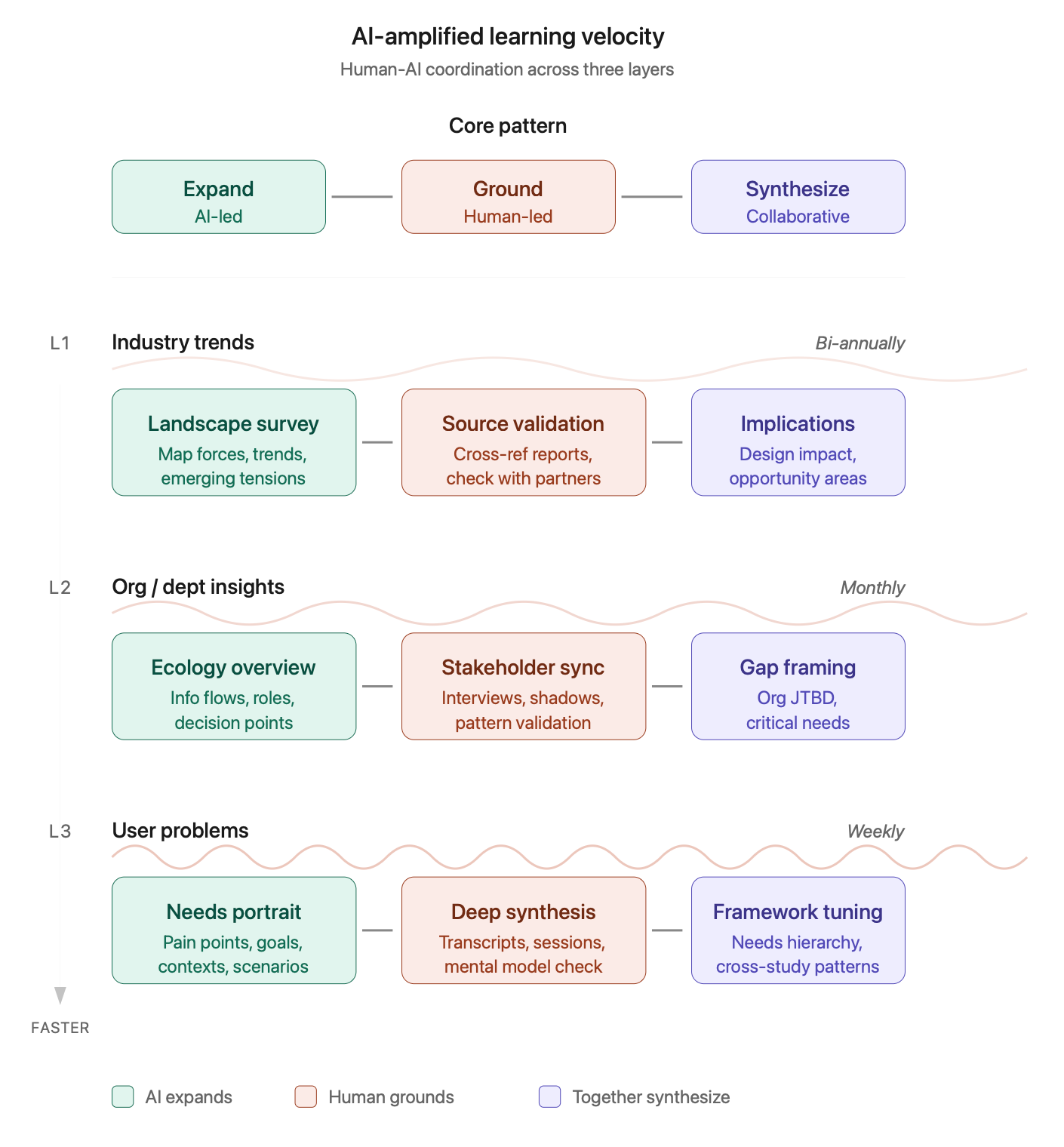
The core pattern: Expand → Ground → Synthesize
Before diving into each layer, here’s the basic rhythm working across all three:
AI expands the landscape: generating possibilities, surfacing patterns, mapping territories or situations you’d miss on your own
You ground it in reality: validating against real sources, applying judgment, catching hallucinations and revealing potential blindspots
Together you synthesize: refining frameworks, sharpening language, creating artifacts that hold up to scrutiny, and can anchor productive team dialogues
This isn’t “AI does the work, and you review it.” It’s a genuine back-and-forth collaboration or interaction where each party contributes what they’re good at. AI is fast, broad, and tireless. You’re contextual, critical, and accountable. 🤓
❖ Level 1: Industry trends
Tempo: Slow · Bi-annual deep dives
The challenge: Industry learning feels overwhelming. There’s too much to read, too many conferences, too many “2026 trends” posts. Most designers either ignore this layer entirely or skim so superficially they can’t act on what they’ve learned. 😑
⚡️ AI-amplified workflow
Step 1: Landscape framing (AI-led)
Start by having AI map the territory. Give it a domain and ask it to generate a comprehensive landscape of categories, forces, and emerging tensions.
Example prompt:
“You’re a strategic analyst studying enterprise B2B software. Map the major forces shaping this industry over the next 2-3 years: regulatory shifts, technology trends, buyer behavior changes, competitive dynamics, and emerging business models. For each force, note whether it’s accelerating, stabilizing, or uncertain.”
What you get: A structured overview that would take you hours to compile from scattered sources. It won’t be perfect, but it gives you a frame to interrogate.
Step 2: Source validation (human-led)
Now you do the work AI can’t: grounding the landscape in real sources.
Cross-reference the AI’s claims against analyst reports your company already pays for
Check 2-3 credible industry publications for confirmation or contradiction
Talk to your PM, strategy, or sales partners; simply ask “does this match what you’re seeing?” to identify blindspots
Note where the AI was wrong, overstated, or missing context
This step is truly non-negotiable. Your AI tool will confidently generate plausible-sounding trends that aren’t actually happening. Your job is to separate signal from hallucination. 🙃
Step 3: Implications synthesis (collaborative)
Return to the AI with your validated landscape and ask it to help you extract potential, prioritized UX/product design implications.
Example prompt:
“Given these validated industry trends [paste your refined list], what are the implications for product design in this space? Where might user expectations shift? What capabilities might become table stakes? What new problem spaces might open up?”
Then pressure-test its answers: Do these implications match what you’re seeing in user research? Are there internal constraints that make certain directions impossible? What’s missing?
Output: A 1-2 page “industry context” document you can reference in design reviews & strategy discussions. Update it bi-annually. ✅
❖ Level 2: Org / Departmental insights
Tempo: Medium · Monthly check-ins
The challenge: Understanding how your customer’s internal organization actually works — in terms of information flows, decision-making patterns, cross-functional dependencies — is a kind of invisible curriculum. Nobody teaches it, yet it determines whether your designs are truly adopted well.
⚡️ AI-amplified workflow
Step 1: Information ecology mapping (collaborative)
Use AI as a thought partner to map the information ecology around your product’s intended usage/deployment area. This requires you to bring context; the AI tool helps you structure it.
Example prompt:
“I’m a product designer working on [X feature area] for a [customer organization type]. Help me map the information ecology: who generates data that should inform their workflow and product decisions? Who consumes workflow outputs? Where do workflow insights get stuck or lost? What questions should I be asking to understand the information flows?”
Use the questions it generates to guide your customer conversations, sussing out their internal stakeholder dynamics and relational model. Come back with what you learned and ask AI to help you diagram the ecology of flows & nodes.
Step 2: Stakeholder mental model synthesis (human-led, AI-assisted)
After your customer conversations (which might also include coffees with your own internal Sales team, shadowing your own Support members, attending cross-functional meetings with customers (buyers, delegates, champions)), use the AI to help synthesize patterns.
Example prompt:
“I’ve had conversations with five customer-oriented stakeholders across Sales, Support, and Product. Here are my raw notes: [paste notes]. Help me identify: recurring themes, points of tension or disagreement, unmet needs they’ve expressed, and gaps where I need more information.”
AI is useful here for pattern-finding across messy notes; but you must validate that its synthesis actually matches what you heard. It will sometimes invent coherence that wasn’t there. 😅
Step 3: Gap & opportunity framing (collaborative)
With your understanding of information flows + stakeholder needs, work with the AI tool to frame an organizational “jobs to be done.”
Example prompt:
“Based on this information ecology map and these customer team’s needs, what are the critical gaps in how the customer’s organization understands and serves their goals per existing workflows and power dynamics? Frame these as ‘jobs to be done’ at the organizational level — what is the customer’s org trying to accomplish that it’s currently struggling with?”
Pressure-test by asking: Would they recognize these as real problems? Which ones have energy and sponsorship? Which ones are third-rail issues no one wants to touch?
Output: An “Org Context” document that maps key roles, information flows, critical gaps, and organizational JTBD. Update monthly as you learn more. ✅
❖ Level 3: User problems
Tempo: Fast · Weekly learning loops
The challenge: This is where most designers already focus, but perhaps inefficiently. You’re often running various studies, collecting feedback, reading tickets... and still feeling like you’re pattern-matching on too little data, too slowly. 😬
⚡️ AI-amplified workflow
Step 1: Needs landscape generation (AI-led)
Before diving into specific research, use your AI to generate a broad landscape of potential user needs in your problem space.
Example prompt:
“You’re an expert accomplished UX researcher studying [user type] trying to accomplish [core job]. Generate a comprehensive landscape of needs, pain points, and goals these users might have, as organized by journey stage, usage context, or psychological / emotional state. Be exhaustive; I’ll narrow down based on what’s relevant to our product.”
This gives you a preliminary map to test against. It’s useful for interview guide design and for noticing needs you might have overlooked.
Step 2: Deep patterns synthesis (human-led, AI-assisted)
After you’ve conducted interviews, watched session recordings, or reviewed support tickets, use the AI tool to help unpack linguistic patterns and mental models. Research tools like Dovetail and UserTesting already support these capabilities, or tap into the AI-enhanced abilities of Zoom recordings, as well.
Example prompt:
“Here are transcripts from five user interviews about [topic]: [paste transcripts]. Analyze the language users employ when discussing their needs. What mental models are they revealing? What emotional undertones appear? Where do users struggle to articulate what they want?”
(Note: Always sanitize transcripts before pasting — remove names and identifying details.)
But here’s the critical move: don’t take the AI’s synthesis as ground truth. Use it as a starting point for your own close reading. Go back to the transcripts and check whether the patterns AI surfaced actually hold!
Step 3: Framework refinement (collaborative)
Use your validated patterns to build and refine a user needs framework iteratively, with AI as your resourceful thought partner.
Example prompt:
“Based on this synthesis, I’m organizing user needs around these anchor statements: [list your draft anchors]. Help me pressure-test this framework: Are these mutually exclusive? Collectively exhaustive? At the right level of granularity for product prioritization? Suggest useful refinements.”
Then take the refined framework back to your set of customers’ day-to-day users for validation. Does it resonate? Does it help people reveal deeper preferences and further delineate their goals or obstacles?
Step 4: Cross-pattern synthesis (collaborative)
As you accumulate quant & qual data over time, use AI to help you see across studies.
Example prompt:
“Here are insights from three research efforts over the past quarter: [summaries]. What patterns emerge across these studies? Where do findings converge? Where do they contradict? What new questions should we be asking?”
Output: A living “User Needs Framework” document with ranked needs, supporting evidence, and open questions. Update weekly or bi-weekly based on continuous inputs. ✅
Making this sustainable…
A few pointers for making AI-amplified learning a truly ingrained habit, not a tedious burden:
Timebox activities ruthlessly. Industry layer: 2-3 hours per quarter. Org layer: 1-2 hours per month. User layer: 30-60 minutes per week. These aren’t academic research projects; they’re product maintenance habits.
Document your AI conversations. Keep a running doc of prompts that worked well. Note where AI led you astray. Build your own playbook over time, as a shared resource for other designers/researchers and yes, your partners in Product, Sales, and other areas. 🙌🏽
Always close the loop with humans. Every AI-generated insight should eventually get pressure-tested against a real stakeholder, user, or source. AI accelerates your learning; it doesn’t replace validation.
Protect confidentiality by default. Before pasting transcripts, notes, or internal documents into any AI tool, please scrub names, company identifiers, and sensitive details — or use your organization's enterprise-grade AI tools that have appropriate data handling agreements. This is critical for user research data, where participants trusted you with their candor.
A useful habit: create a "sanitized paste" version of any transcript before AI-assisted synthesis, replacing names with role labels (e.g., "Support Lead A," "End User 3"). It takes just two minutes and avoids accidentally training models on data you don't own. 😬
Track assumption changes, not just info intake. The goal isn’t “I learned about industry trends.” It’s “I revised my belief about X because of Y.” Keep a log!
Share what you learn. The highest-leverage use of your learning velocity is helping your team learn faster too. Turn your documents into digestible artifacts: a Slack post, a 5-minute standup share, a Notion page others can reference. Sharing is caring!
The shift — AI as “learning partner”
What I’ve outlined here isn’t really a process — it’s a relationship. But it’s a working relationship, not a substitute for human collaboration! 😊 AI emerges as a thinking partner you return to with confidence, building context over time (within conversations), and helping you move faster than you could alone.
The designers who thrive in the next decade may be the ones who develop learning fluency — that ability to coordinate human + machine intelligence across multiple altitudes, at appropriate tempos, in service of better product and design decisions. ⚡️
What’s worked for you? I’d love to hear how you’re using AI to accelerate learning in your own practice — or where you’ve found the limits.